CDN
1. Building blocks
- PoPs (Points of Presence): CDN PoPs (Points of Presence) are strategically located data centers responsible for communicating with users in their geographic vicinity. Their main function is to reduce round trip time by bringing the content closer to the website’s visitor. Each CDN PoP typically contains numerous caching servers.
- Caching servers: Caching servers are responsible for the storage and delivery of cached files. Their main function is to accelerate website load times and reduce bandwidth consumption. Each CDN caching server typically holds multiple storage drives and high amounts of RAM resources.
-
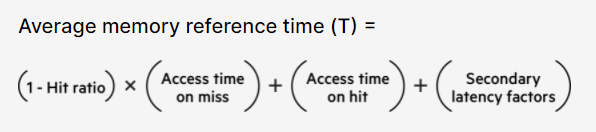
SSD/HDD + RAM: Inside CDN caching servers, cached files are stored on solid-state and hard-disk drives (SSD and HDD) or in random-access memory (RAM), with the more commonly-used files hosted on the more speedy mediums. Being the fastest of the three, RAM is typically used to store the most frequently-accessed items.
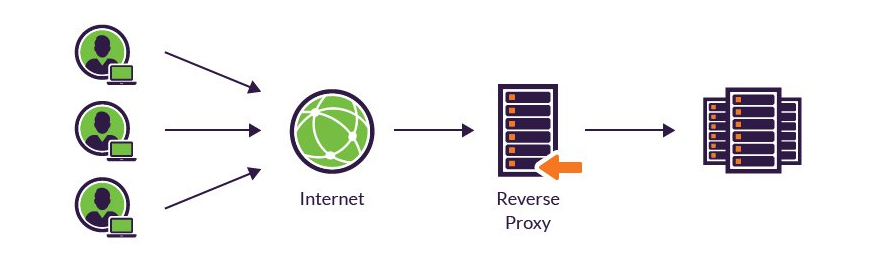
- Reverse proxy
- Receiving a user connection request
- Completing a TCP three-way handshake, terminating the initial connection
- Connecting with the origin server and forwarding the original request
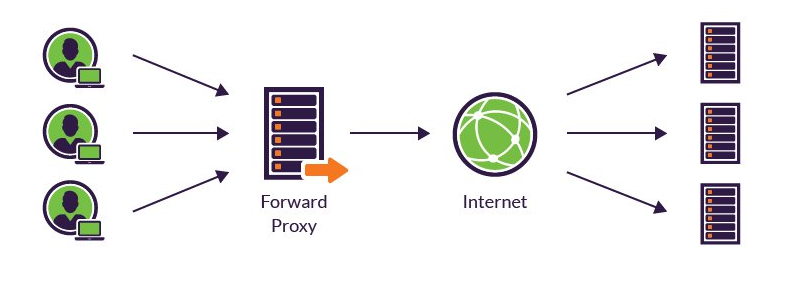
- Forward proxy
- Block employees from visiting certain websites
- Monitor employee online activity
- Block malicious traffic from reaching an origin server
- Improve the user experience by caching external site content
- CDN using reverse proxy servers
- Content caching: Reverse proxies are placed in several geographically dispersed locations, where mirror versions of website pages are compressed and cached. This facilitates rapid content delivery based on client geolocation, helping to reduce page load times and improve your user experience.
- Traffic scrubbing: Prevent DDoS & security threads from outside. Located in front of your backend servers, reverse proxies are ideally situated to scrub all incoming application traffic before it’s sent on to your backend servers.
- IP masking: When routing your incoming traffic through a reverse proxy server, connections are first terminated by the proxy and then reopened with the backend server. From your users’ perspective, their requests are resolved via the proxy IP.
- Load balancing: Because reverse proxy server are the gateway between users and your application’s origin server, they’re able to determine where to route individual HTTP sessions. For applications using multiple backend servers, this means the reverse proxy can efficiently distribute the load, thereby improving overall user experience and helping ensure high availability. In the event that a server goes down, reverse proxies act as a failover solution, rerouting traffic to ensure continued site availability.
2. CDN Architecture
- Four pilliar of CDN: Performance (location, low-latency, high bandwidth), Scalability (high bandwidth resource, DDoS protection), Reliability (high availability, no single point failure), Responsiveness (quick configuration propagation, sync)
- Caching: HDD<SSD<RAM
- Topology: The Scattered CDN, The Consolidated CDN (mainly about cost/DDoS)
3. CDN caching
- static file: image/videos/music/javascript/css (cu down cost/improve user experience/reliable delivery)
- CDN chache algorithm:
- caching header: Web developers use HTTP cache headers to mark cacheable web content and set cache durations. Using cache headers, you can control your caching strategy by establishing optimum cache policies that ensure the freshness of your content. For example: “Cache-Control: max-age=3600” means that the file can be cached for no longer than an hour before it must be refetched from the origin content.
- cache control:
- Cache-Control: public – enables caching by public platforms such as CDNs.
- Cache-Control: private – reserved for private information that is designated non-cacheable.
- Cache-Control: no-cache – requires validation before caching.
- Cache-Control: no-store – completely prohibits caching.
- Expires: Similar to Cache-Control: max-age, sets the time of content expiration and removal.
- Surrogate: Gives you increased control over cache policies, acting with the authority of the origin server.
- Etag: Provides your cached web content with unique identifiers, enabling individual labeling and more sophisticated sorting.
- Pragma: Largely supplanted by Cache Control, Pragma was previously used to handle caching instructions for browsers.
- Vary (use with caution): Some browsers still struggle with supporting the Vary header. When used properly, Vary can be a powerful tool for managing delivery of multiple file versions, especially for compressed files cached alongside their uncompressed counterparts.
- Smart cache control: Cache with strategy. (Location, Frequency, ML prediction, Expire policy)
- Must-have cache options:
- Purge cache: refresh immediately
- Always/Never cache: Helps you manually override cache headers, tagging files that should be always served or never served from cache.
- Cache for period: A refinement of the Always cache option, this allows you to set a specific period during which the object should be served from cache before refreshing.
4. Front End Optimization - Time to First Byte
- Reducing HTTP requests: e.g. consolidate multiple image
- File compression: zip thing
- Cache optimization: CDN
- Code minification: code optimization
- Image optimization: single image compression, with low resolution/quality first, vector img
5. CDN and SSL/TLS
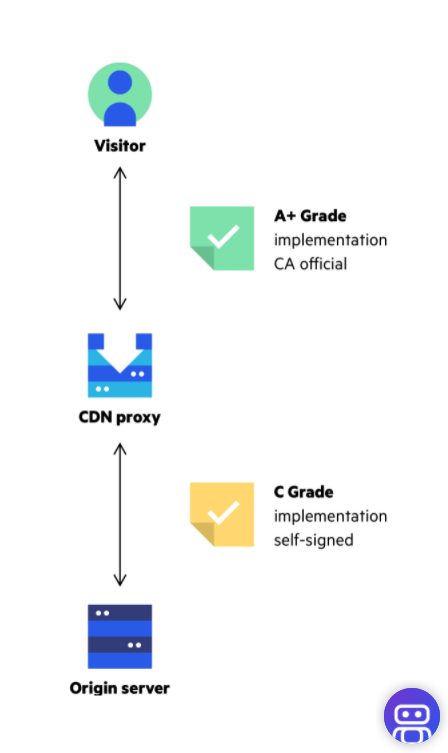
- CDN can boost SSL/TLS performance: can perform a TCP handshake at edge in replacement of the server
- CDN can boost SSL/TLS security: CDN for an No-Hassle Grade A+ Certificate (CDN-SERVER connection is always secured.)
6. Route Optimization
- Using Anycast to Localize Content Delivery
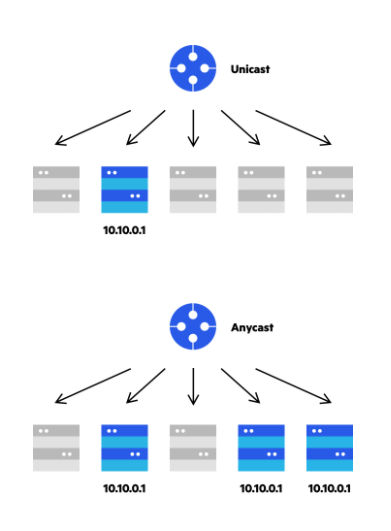
- Regional Anycast: With regional anycast, a network is divided into virtual clusters; each corresponds to a specific geographic area. Identical IP ranges are advertised only on nodes within the region, not on the rest of the network. (Enterprise with a large network could have 2-layer CDN structure, which enterprise manage the consolidated ones, related on the scattered ones)
- Commercial CDNs use their funds and bargaining power to purchase transit directly from tier 1 providers. As a CDN subscriber, your website visitors benefit from that arrangement. They reach your website directly via the Internet backbone, with minimal hops and very low risk of packet loss.
How CDN works from Patrick
- Normally it works with Geolocation DNS, which re-directs the traffic to the CNAME (Alias) near the end user rather than the A record.
- The DNS request remind with the original URL in header and the CDN server are sort of trained to learn only the request with original URL.
- CDN has a layered design.
- For example, like Nvidia.cn will be cached from Nvidia.com’s cache edge.
- If might now be connected to the original server but a CDN server instead (also a URL which could be translated into IPs)
- requests first go to DNS and will be directed from top domain down to CDN edge layer via CNAMES set by all parties, in NV example, NV sets top domain to us, we set geofencing to split between ZL and VZ, if not present on HDD of edge, request is forwarded to an upper layer, goes on till origin facing then to origin.
- route to originexample,
- BMW GERMANY
- CHINA EDGE — BJ — FRA — ORIGIN
- CHINA EDGE — SH —
- harddrive — RAM, NVME, SSD, HDD
- CURL to check the CDN header (HTML things)
CDN add graph
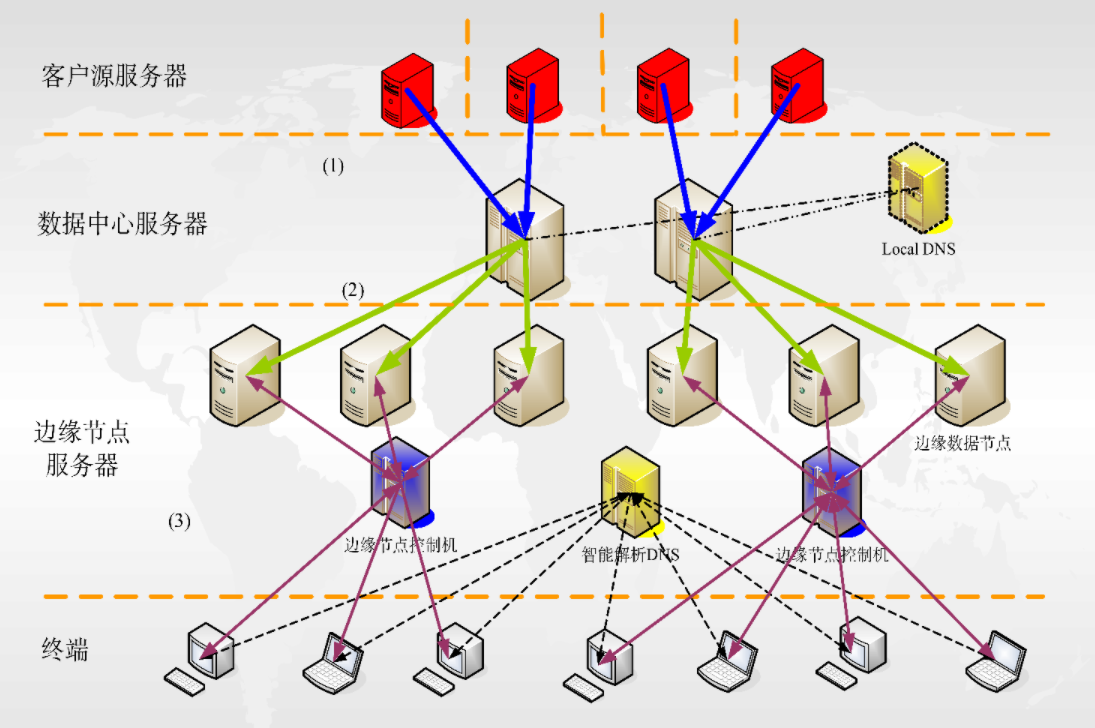
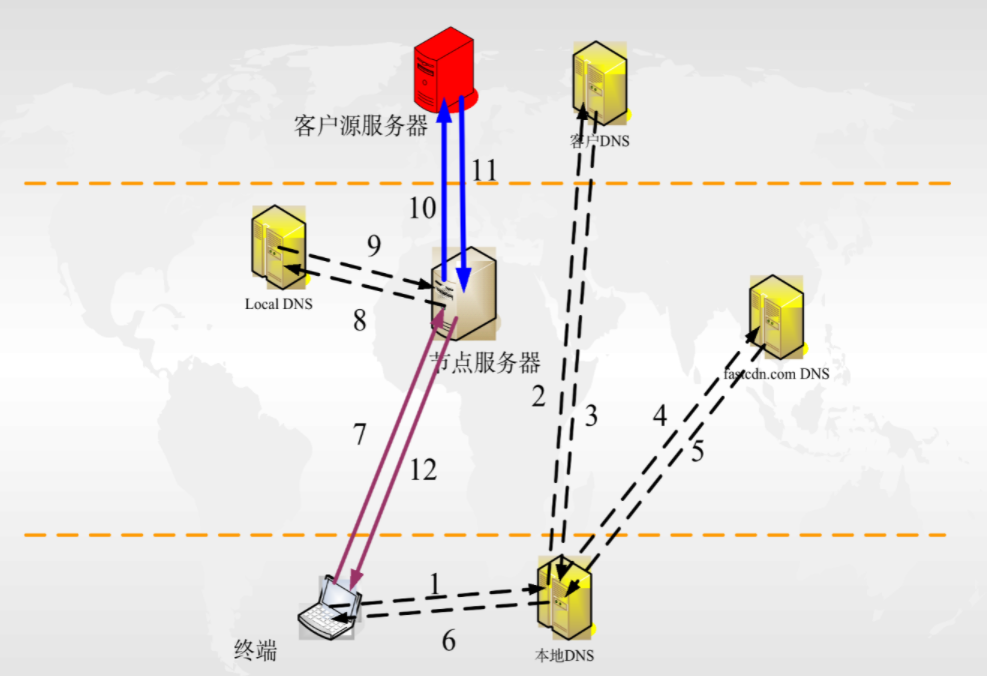
troubleshooting on CDN ZGA
- PING/MTR/UDPPING/TCPPING
- dig google.com; dig @8.8.8.8 google.com
- telnet 如果拒绝就是有防火墙或者端口没开,长trying那就是三层防火墙
- curl:
curl https://www.beautinow.com/api 查看是否能够访问 curl -svo /dev/null https://www.beautinow.com/api 不输出请求的返回值,查看详细的请求过程和结果 curl -svo /dev/null –resolve www.beautinow.com:443:13.224.163.105 https://www.beautinow.com/api 将请求强制解析到源站测试能否正常访问 curl -svo /dev/null -w time_namelookup:”\t”%{time_namelookup}”\n”time_connect:”\t\t”%{time_connect}”\n”time_appconnect:”\t”%{time_appconnect}”\n”time_pretransfer:”\t”%{time_pretransfer}”\n”time_starttransfer:”\t”%{time_starttransfer}”\n”time_total:”\t\t”%{time_total}”\n”time_redirect:”\t\t”%{time_redirect}”\n” https://www.beautinow.com/api
Build a simple CDN from scrach
To build even a simple content delivery network you need the following:
- domain name or a subdomain (probably cdn.xxx.net or something similiar)
- servers in diff regions (some linux servers or whatever might fit)
- geoDNS tool. (can be set up by own DNS service?)
configuration
- In our example, the CDN will operate on the cdn.sayt.in subdomain. Having added the sayt.in zone, create the first A record for the subdomain and direct all NA clients to the Chicago server.
- Repeat this step for the other regions and don’t forget to create one record for default regions. (All A records)
- Installing SSL certificates
- What is an SSL certificate?
An SSL certificate is a digital certificate that authenticates a website’s identity and enables an encrypted connection. SSL stands for Secure Sockets Layer, a security protocol that creates an encrypted link between a web server and a web browser.- A browser or server attempts to connect to a website (i.e., a web server) secured with SSL.
- The browser or server requests that the web server identifies itself.
- The web server sends the browser or server a copy of its SSL certificate in response.
- The browser or server checks to see whether it trusts the SSL certificate. If it does, it signals this to the webserver.
- The web server then returns a digitally signed acknowledgment to start an SSL encrypted session.
- Encrypted data is shared between the browser or server and the webserver.
- SSL certificates can be obtained directly from a Certificate Authority (CA). Certificate Authorities – sometimes also referred to as Certification Authorities – issue millions of SSL certificates each year. They play a critical role in how the internet operates and how transparent, trusted interactions can occur online.
- SSL certificates do expire; they don’t last forever. The Certificate Authority/Browser Forum, which serves as the de facto regulatory body for the SSL industry, states that SSL certificates should have a lifespan of no more than 27 months. This essentially means two years plus you can carry over up to three months if you renew with time remaining on your previous SSL certificate.
- Obtaining your SSL involves the following steps:
- Prepare by getting your server set up and ensuring your WHOIS record is updated and matches what you are submitting to the Certificate Authority (it needs to show the correct company name and address, etc.)
- Generating a Certificate Signing Request (CSR) on your server. This is an action your hosting company can assist with.
- Submitting this to the Certificate Authority to validate your domain and company details
- Installing the certificate they provide once the process is complete.
- What is an SSL certificate?